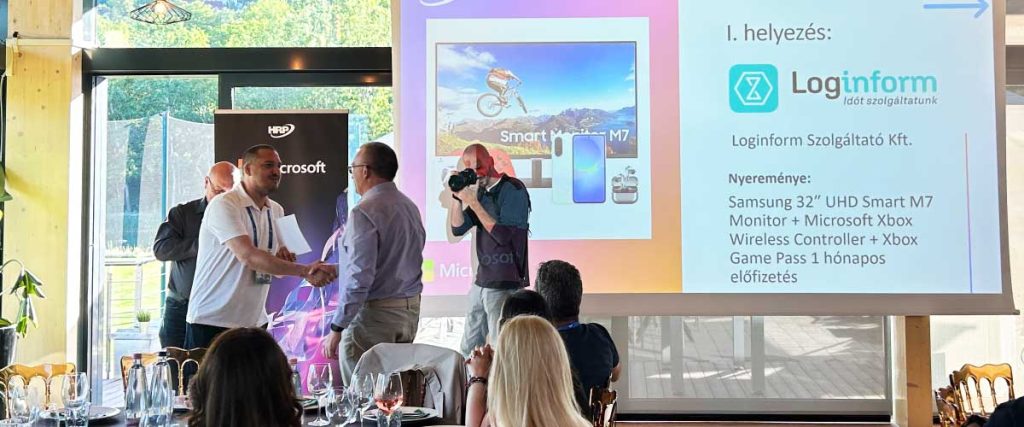



Loginform Award at the Cloud Service Providers’ Partner Day: We Won First Place in “The Masters of Conversion” Category
2026-05-29
From Navision to cloud-based Business Central: why finance leaders should pay attention now
2026-06-20
Updated: 2026. Information related to prices, legislation, and grants may change quickly, so before making a decision, it is always worth checking the latest official sources and consulting with experts.
Quick Summary
An ERP, or enterprise resource planning system, is an integrated software solution that manages a company’s most important processes in one place: finance, inventory, purchasing, sales, manufacturing, projects, and reporting.
A good ERP is not merely an administrative tool, but also a management decision-support system. The key to choosing the right solution is not the software itself, but how well the system fits the company’s processes, financial operations, and growth plans.
For growing SMEs and mid-sized companies, Microsoft Dynamics 365 Business Central often becomes a relevant option because it provides an international ERP foundation, cloud-based operation, a strong financial focus, and highly expandable business functionality in one system.
1. The Basics: What Should You Know About ERP Systems?
What is an ERP system, and what exactly does the acronym mean?
ERP stands for Enterprise Resource Planning. In Hungarian, it is most commonly referred to as a vállalatirányítási rendszer, or enterprise management system. Its purpose is to organize the main operational areas of a company into a shared database and a unified process logic.
In practice, this means that finance, inventory, purchasing, sales, manufacturing, projects, and management reports do not operate as separate islands. The same data is created once, and every relevant department works from the same fresh, verified information.
For example, an incoming order does not only appear in sales. It may also affect inventory reservation, purchasing requirements, invoicing, accounting, cash flow, and management reports. In a well-implemented ERP system, these connections are not created afterwards through Excel reconciliations, but are built into the system’s operation.
How does an enterprise resource planning system work in practice?
Most ERP systems have a modular structure. There are modules for finance, inventory management, purchasing, sales, manufacturing, project management, reporting, and other areas. These are not separate programs, but units built on the same database and process system.
The shared database is important because it eliminates one of the most common business problems: the repeated manual entry of the same data. If sales, warehouse, and finance teams work in different spreadsheets, discrepancies, misunderstandings, and unnecessary reconciliations will eventually appear.
The role of an ERP system is to replace these with controlled, transparent, and traceable operations.
Microsoft Dynamics 365 Business Central, for example, is a business system specifically designed for small and medium-sized companies. It can manage finance, sales, purchasing, inventory, manufacturing, projects, and service processes, while also integrating well with the Microsoft ecosystem, including Excel, Outlook, Teams, Power BI, and Power Automate.
What is the difference between invoicing software, inventory management software, and a real ERP system?
An invoicing program solves one specific task: it issues invoices, manages basic partner and document data, and complies with invoicing regulations. An inventory management system also tracks warehouse movements. These are useful tools, but they usually address only one specific business area.
An ERP system, on the other hand, sees the entire business process. It does not only show whether an invoice has been issued, but also what happened before and after it: whether there was a quotation, an order, an inventory reservation, delivery, accounting entry, financial settlement, margin calculation, or management report.
This is why ERP systems involve higher costs and a more serious implementation process. In return, however, they do not merely solve an administrative problem. They make the company’s operations more transparent.
What is the difference between ERP, CRM, and WMS?
In short, ERP is the backbone system of company operations, CRM is specialized in customer relationship management, and WMS focuses on warehouse processes.
| Aspect | ERP | CRM | WMS |
|---|---|---|---|
| Main focus | Complete business operations | Customer relationships, sales, marketing | Warehouse and logistics |
| Typical users | Finance, purchasing, manufacturing, management | Sales and marketing | Warehouse, logistics |
| Central question | How does my company operate? | How do I acquire and retain customers? | Where is the goods, and how does it move? |
Modern ERP systems often include CRM and warehouse functions as well. The real question is not whether a company needs a separate system for everything, but which setup creates less manual work, fewer errors, and better management control.
In a Business Central environment, many functions are available natively, while special requirements can be connected to the system through integrations or custom development.
2. Business Benefits: Why Does a Company Need ERP?
What business problems does an integrated ERP solve?
The greatest value of an ERP system is that it brings order to data and processes. Most companies do not arrive at the need for ERP overnight. First come Excel spreadsheets, separate invoicing tools, separate warehouse records, and separate financial reports. After a while, nobody is completely sure which data is up to date and which one is true.
Typical problems that an ERP system can solve include:
- the same data has to be entered in multiple places;
- management reports are completed days or weeks late;
- inventory data differs from reality;
- finance manually reconciles invoices, bank data, and reports;
- the webshop, warehouse, invoicing, and accounting are not connected;
- the company is growing, but its back-office processes cannot keep up;
- management does not make decisions based on real-time data.
A well-implemented ERP is not good because it “knows everything.” It is good because, when aligned with the company’s operations, it reduces unnecessary work, errors, and uncertainty.
How can you tell that your business has reached the ERP level?
The clearest sign is when growth is no longer limited by the market, but by internal administration. If more and more people are needed to manually handle the same amount of data, if reports are delayed, or if financial and inventory data are regularly disputed, the company has probably outgrown its separate solutions.
Some specific warning signs:
- sales, warehouse, and finance see different data;
- management decisions require manual data collection from several systems;
- launching a new product, site, or market creates disproportionately high administration;
- accounting and finance spend too much time on reconciliation;
- management has no up-to-date visibility into margin, inventory, receivables, or cash flow;
- developing the existing system further has become more expensive and risky than introducing a new one.
At this point, ERP is no longer a luxury, but a condition of controlled growth.
How can the return on investment of an ERP system be calculated?
The return on investment of an ERP system should not be measured only against the license fee. The full picture comes from looking at TCO, or total cost of ownership, together with the business benefits.
The benefits may come from several areas:
- Saved working time: less manual data entry, fewer Excel reconciliations, faster closing.
- Fewer errors: more accurate invoicing, inventory, orders, and financial data.
- Better decisions: real-time financial and operational reports.
- Faster processes: more efficient purchasing, order management, manufacturing, or project accounting.
- Lower compliance risk: up-to-date reporting, permission management, and logging.
- Scalable operations: company growth does not require proportionally growing administration.
It is worth thinking in a 3–5-year horizon. In the first year, implementation and training usually require most of the attention. The real return often becomes visible in the second or third year.
3. Which ERP Fits Which Company? By Company Size and Industry
How do ERP needs differ for micro, small, and mid-sized businesses?
Company size mainly determines complexity, budget, and the depth of implementation. The question is not whether a smaller company “needs” ERP, but what depth of system is justified.
| Company size | Typical need | Typical solution |
|---|---|---|
| Micro business | Invoicing, basic inventory, simple finance | Quickly implemented cloud solution |
| Small business | Connecting multiple departments, reports, simple integrations | Modular cloud or hybrid ERP |
| Mid-sized company | Multiple sites, manufacturing, complex finance, deep integrations | Scalable ERP, dedicated implementation project |
Problems usually arise from oversizing or undersizing. A micro business does not need an unnecessarily complex system, while a fast-growing mid-sized company cannot remain in a solution that cannot support future processes.
Business Central typically becomes a particularly interesting option where a company has already outgrown simple invoicing and inventory programs but does not yet want enterprise-level ERP complexity. It can be especially strong for organizations where finance, inventory, purchasing, sales, project management, or manufacturing are becoming increasingly connected.
In which industries is ERP especially important?
Almost every growing company may need ERP, but the need appears differently by industry.
- Commerce and e-commerce: inventory, pricing, webshop integration, multi-channel sales.
- Manufacturing: bills of materials, production planning, capacity, serial and batch management.
- Services: project management, time and cost tracking, project-based invoicing.
- Logistics: warehouse movements, tracking, delivery processes.
- Finance- and administration-focused companies: closing, reporting, cost centers, receivables, cash flow, data reporting.
When choosing a system, it is not enough to check whether a given ERP “can handle manufacturing” or “has an inventory module.” The real question is how safely it can reflect your own business logic, financial processes, and industry-specific requirements.
Why are scalability and future-proofing important?
ERP is not chosen for a few months. A good system can be the foundation of company operations for 7–10 years, which means it should not only support the current state of the business.
When making the decision, it is worth examining what the company may look like in 3–5 years: more users, more sites, higher transaction volume, new markets, new integrations, or more complex financial reporting.
Key aspects of future-proofing:
- whether the system can be expanded with modules;
- whether it can handle growing data and transaction volumes;
- whether it has open APIs and stable integration options;
- whether the vendor follows legal and technological changes;
- whether it supports cloud operation;
- whether modern automation and AI-based functions can be used in it;
- whether adequate expert and development support is available.
From this perspective, Business Central can be a strong choice because Microsoft continuously develops it, and the cloud version regularly receives new features, security updates, and AI-related capabilities.
4. Modules and Functions: How is an ERP System Structured?
What are the most important ERP modules?
ERP modules cover the different operational areas of a company. Most implementations start with finance and inventory management, then expand gradually.
Common modules include:
- Finance and accounting: general ledger, customers, vendors, bank, VAT, closing, reports.
- Inventory and warehouse: receipts, issues, stocktaking, inventory levels, warehouse movements.
- Purchasing: requests for quotation, orders, supplier processes.
- Sales: quotations, orders, invoicing, customer master data.
- Manufacturing: bills of materials, capacity, production orders, planning.
- Project management: tasks, efforts, costs, project-based invoicing.
- CRM: contact management, sales opportunities, customer history.
- Reporting and BI: management reports, dashboards, financial and operational KPIs.
One of the advantages of Business Central is that it covers many of these areas by default, while special requirements can be connected through extensions, Power Platform solutions, or custom development.
How does ERP support cooperation between departments?
ERP reduces organizational friction because every department works from the same data. Sales can see inventory, finance can see receivables, management can see margins, and purchasing can see when reordering is needed.
This is not only a technological issue. A shared system also creates a shared language within the company. There are fewer misunderstandings of the “we do it differently in our department” type, because processes must be clarified during implementation.
That is why an ERP project is truly successful when it is not treated merely as software installation. Implementation is also process development, data quality improvement, and organizational learning.
How does ERP connect to other systems?
Few companies operate with a single piece of software. Most businesses have a webshop, banking system, payroll solution, document management system, CRM, manufacturing system, or external reporting tool. The value of an ERP system is largely determined by how stably it can connect to these.
Important integration areas include:
- webshop and marketplace;
- banking connections;
- NAV Online Invoice and eVAT;
- payroll;
- document management;
- Power BI or another business intelligence tool;
- manufacturing or industry-specific systems;
- logistics service providers;
- Microsoft 365 environment.
A key strength of Business Central is that, as part of the Microsoft ecosystem, it naturally fits with several office, reporting, and automation tools. This can also help everyday user adoption, as many employees are already familiar with Excel, Outlook, or Teams.
5. Cloud, On-Premise, or Hybrid Solution?
Cloud-based ERP: when is it a good choice?
The greatest advantage of cloud-based, subscription ERP systems is that they operate with lower entry costs, less in-house infrastructure, and regular updates. The system does not run on the company’s own server, but is available as a service.
Advantages include:
- lower initial investment;
- automatic updates;
- less internal IT operation;
- flexible number of users;
- support for remote work;
- faster technological renewal.
For growing SMEs and mid-sized companies, this is often the most practical direction today, especially if the company does not have a large internal IT team, or if fast start-up and continuous up-to-dateness are important.
On-premise ERP: when is it justified?
An on-premise ERP runs on the company’s own server. This can provide greater control over infrastructure, but it requires internal IT capacity, operational knowledge, and regular maintenance.
It may be justified if:
- the company has a strong internal IT team;
- there are special data management or industry requirements;
- it must connect closely to older, locally running systems;
- the company’s infrastructure and regulations require it.
At the same time, it is worth thinking in terms of total cost. The costs of servers, backups, updates, security, operation, and version tracking often appear later.
Hybrid model: when is it worth considering?
A hybrid model combines cloud-based and on-premise solutions. For example, a company may keep some critical systems locally, while using reporting, CRM, or collaboration functions from the cloud.
This is flexible, but more complex. In a hybrid model, it is especially important to clarify integrations, permissions, data security, and operational responsibilities.
6. Hungarian Specifics: NAV, eVAT, Compliance
How does ERP handle NAV Online Invoice and eVAT reporting?
In Hungary, one of the critical tasks of an ERP system is to ensure that financial and data reporting processes comply with legislation. Handling NAV Online Invoice, eVAT, and data reporting schemas is not a convenience feature, but a matter of business risk reduction.
A good ERP does not only send data. It supports the entire process:
- checks mandatory fields;
- manages communication with NAV;
- provides status feedback;
- logs events;
- quickly follows schema changes;
- supports financial closing and tax return processes.
In the case of Business Central, Hungarian localization and the implementation partner’s up-to-date financial and accounting expertise are especially important. The technological capability of the system alone is not enough. One must also understand how Hungarian accounting, VAT handling, closing, reporting, and data submission work in practice.
What does it mean for a system to be “NAV-ready”?
A “NAV-ready” system does not mean that the NAV connection was once configured at some point. It means that the system can continuously follow data reporting requirements, handle errors, provide feedback, and support the finance team even when regulations change.
Characteristics of a NAV-ready ERP:
- up-to-date technical connection;
- automatic validation;
- status management and error reporting;
- transparent logging;
- fast schema tracking;
- support that also makes sense from a financial and accounting perspective.
This is the point where the expertise of the implementation partner is at least as important as the software itself.
How do AI and the EU AI Act affect ERP?
More and more AI-based functions are appearing in ERP systems: automated recommendations, predictive analytics, natural language queries, document processing, and customer service assistants.
These are useful, but they must be introduced consciously. It is important to clarify:
- what data the AI works from;
- who approves its recommendations;
- whether its operation can be logged;
- whether affected parties must be informed;
- whether it complies with the company’s internal data protection and compliance rules.
The AI developments in Business Central and the Microsoft ecosystem offer exciting opportunities, but in a business environment AI is not an end in itself. It is valuable when it results in less manual work, better control, and faster decisions.
7. ERP Systems and Vendors: What Solutions Are Available?
There are several well-known vendors and systems on the ERP market, so it is worth thinking based on business fit rather than brand name. A different system may be ideal for a micro business, a trading SME, a manufacturing mid-sized company, or an international enterprise.
Frequently mentioned ERP solutions and vendors include:
- Microsoft Dynamics 365 Business Central: an ERP designed for small and medium-sized companies, available in cloud or hybrid models, with strong finance, inventory management, purchasing, sales, project, and manufacturing functions. Its advantage is natural integration with Microsoft 365, Power BI, Power Automate, and Teams.
- SAP Business One: an SAP solution mainly developed for smaller and medium-sized companies, often used to cover classic enterprise resource planning functions.
- SAP S/4HANA: an enterprise-level, complex ERP environment that typically requires significant organizational, process, and IT maturity.
- Oracle NetSuite: a cloud-based ERP that may be relevant for international operations, multiple countries, multiple subsidiaries, or rapid scaling.
- Odoo: a modular, flexible system offering a wide range of business functions, often considered by companies where gradual expansion is important.
- IFS, Infor, abas, and other industry ERP systems: typically strong in manufacturing, maintenance, project-based, or industry-specific environments.
- Hungarian invoicing, accounting, and business administration systems: often good starting solutions for smaller companies, but as the business grows, has multiple sites, complex inventory, manufacturing, or management reporting needs, demand may arise for a more integrated ERP system.
This list is not a ranking. The right ERP choice always depends on which processes must be covered, how much internal resource is available, what depth of financial control is needed, and how quickly the company’s operations are changing.
In mid-sized business environments, Business Central often comes to the forefront because it provides an international ERP background, operation aligned with the Microsoft ecosystem, strong financial foundations, and a highly expandable framework. This is especially important for companies that have outgrown simple business administration systems but do not want enterprise-level ERP complexity.
8. The Selection Process: How to Find the Right System?
What are the steps of a good ERP selection process?
A good ERP selection process does not start with a software demo, but with understanding your own operations. The most common mistake is that companies compare feature lists before clarifying what they actually need.
Recommended process:
- Process assessment: how does the company operate today, and where are the pain points?
- Goal setting: what do we expect from ERP: faster closing, more accurate inventory, better reports, less manual work?
- Prioritization of requirements: what is mandatory, and what can be a later extension?
- Budget and schedule: how much time, money, and internal capacity are available?
- Shortlisting systems: selecting 3–5 realistic candidates.
- Demos with real processes: do not request a generic presentation; ask for your own business cases.
- Partner evaluation: who understands your processes, finance, and industry specifics?
- Requesting offers with a TCO mindset: look not only at licenses, but at the full 3–5-year cost.
- Decision and contract: with clear milestones, responsibilities, and support conditions.
Why is it not enough to look only at the software?
The same system can work well with a good partner, but become a painful compromise with poor implementation. The success of an ERP project depends at least as much on the implementation partner as on the selected software.
A good partner does not merely configure fields. They understand the business process, ask questions, provide feedback, indicate risks, and help decide when to use standard functionality, when to change a process, and when custom development is justified.
Especially in a Business Central implementation, it is important that the partner understands the system not only from the technological side. Financial, accounting, data reporting, and reporting logic often determine whether the system truly supports management and daily operations.
What questions should you ask during the demo?
During the demo, do not focus on how impressive the interface looks. Focus on how the system handles your own real-life situations.
Essential questions:
- How does the system handle financial closing, VAT, NAV Online Invoice, and eVAT?
- What does a complete order-to-invoice process look like?
- How can inventory, purchasing, and warehouse movements be managed?
- What reports does management receive daily, weekly, and monthly?
- Are there ready-made integrations for the webshop, bank, document management system, or existing systems?
- What is the total cost over 3–5 years?
- What happens during updates if custom developments are also involved?
- Who provides training and post-go-live support?
- What response time can be expected during live operation?
- Are there references from similar-sized companies or similar industries?
9. Implementation and Execution: How Does an ERP Project Work?
How long does ERP implementation take?
Implementation time strongly depends on company size, process complexity, data migration, integrations, and custom developments. A simpler cloud-based SME project may go live within a few months, while a complex implementation involving multiple sites, manufacturing, or deep integrations may take up to a year.
Typical milestones:
- process assessment and planning;
- system configuration;
- customization and development;
- data migration;
- building integrations;
- testing;
- user training;
- go-live;
- follow-up and fine-tuning.
A good implementation is not good because everything happens quickly. It is good because critical issues are discovered in time, and the company does not encounter data or process problems only at go-live.
Why is data migration critical?
Data migration means moving data from old systems into the new ERP. Many projects are delayed at this stage because old data is incorrect, duplicated, incomplete, or inconsistent.
Steps of successful migration:
- deciding which data should be transferred and what should be archived;
- data cleansing;
- test migration;
- verification;
- correction;
- live migration;
- post-go-live control.
The basic rule is simple: bad data leads to bad decisions in the new system as well. ERP implementation is therefore a good opportunity for the company to put master data, partners, item numbers, inventory data, and financial records in order.
How can employee resistance be managed?
An ERP project is not only an IT change. It changes people’s daily work, so it is natural for employees to have questions, concerns, or resistance.
The foundations of successful change management:
- early communication: why the system is needed;
- understandable goals: how work will become easier;
- involvement of key users;
- practical training;
- patient support after go-live;
- realistic expectations for the first weeks.
The system becomes a real business tool when users experience it not as a burden, but as support.
10. Costs, Licensing, and Hidden Items
How much does an ERP system cost?
The price of ERP depends on company size, number of users, modules, integrations, data migration, custom development, and training. For this reason, no two offers are exactly the same.
Costs should be broken down into several parts:
- license or subscription;
- implementation consulting;
- configuration;
- custom development;
- data migration;
- integrations;
- training;
- project management;
- support and operation;
- later extensions.
In the case of Business Central, the cloud subscription model makes the start more predictable for many companies, but the total cost should not be judged only by the monthly license fee. The real question is what business value the system delivers, and how much manual work, error, or management uncertainty it eliminates.
What hidden costs should you watch out for?
The most common surprise is that significant costs appear later on top of the “cheap” base system.
Typical hidden items include:
- maintenance of custom developments;
- version tracking;
- NAV and legal compliance updates;
- maintaining integrations;
- additional users and modules;
- training new employees;
- correcting data quality problems;
- internal project time;
- support packages.
This is why it is worth asking for a 3–5-year TCO estimate already during the request-for-proposal stage, and clarifying what is included in the price, what is optional, and what counts as separate development.
One-time license or SaaS subscription?
A one-time license may involve a higher initial cost, but in certain cases it can be predictable in the long term. A SaaS subscription offers lower entry cost, more flexible scaling, and continuous updates.
For growing companies, the advantage of the SaaS model is that the system can be better adjusted to changing user numbers and business needs. However, the decision should not be made only from a financial point of view. Operational aspects should also be considered: updates, data security, integrations, internal IT capacity, and support needs.
11. Glossary: Important ERP Terms in Brief
- ERP: an integrated enterprise resource planning system that manages key business processes in a shared database.
- Module: a part of the ERP covering a specific functional area, such as finance, inventory, or manufacturing.
- On-premise: a system running locally on the company’s own server.
- SaaS: software used from the cloud in a subscription model.
- TCO: the total cost of the system over its lifecycle.
- ROI: return on investment.
- Implementation: the full process of introducing the system.
- Data migration: moving data from the old system to the new one.
- Change management: preparing the organization for the new way of working.
- API: a programming interface through which systems exchange data.
- Localization: operation adapted to the legal, language, and business specifics of a given country.
- Power BI: a Microsoft business intelligence tool that can create management dashboards and analyses from ERP data.
- Copilot / AI assistant: artificial intelligence-based support that can provide automation, analysis, or user assistance.
12. Frequently Asked Questions
What is an ERP system in simple terms?
An ERP is a business software solution that manages the company’s main processes, such as finance, inventory, purchasing, sales, manufacturing, and reporting, in one shared system. This means data is created once, and everyone involved sees the same information.
When is it worth implementing ERP?
It is worth considering ERP when separate programs, Excel spreadsheets, and manual reconciliations are already slowing down operations. If management reports take too long, inventory data is unreliable, or finance spends too much time on manual corrections, it is time to think about ERP.
How much does an ERP system cost in Hungary?
The exact cost depends on company size, number of users, modules, integrations, and the level of customization. Smaller projects may start from a few million forints, while more complex mid-sized company implementations may require a much larger investment. The full 3–5-year cost should always be examined.
How long does ERP implementation take?
Simpler cloud projects may go live within a few months, while more complex implementations may take 6–12 months or even longer. Process clarification, data migration, integrations, and training all affect the timeline.
Is ERP mandatory for NAV data reporting?
Using an ERP system is not mandatory in itself, but proper data reporting, invoicing processes, and financial control are essential. A well-implemented ERP can significantly reduce the risk of manual errors and compliance issues.
Should I choose cloud-based or on-premise ERP?
Cloud-based ERP requires less initial infrastructure, offers more flexible scaling, and provides regular updates. On-premise deployment may offer greater control, but requires more internal IT capacity. For growing SMEs and mid-sized companies, the cloud model is often the more practical choice today.
How is Business Central different from SAP, Oracle NetSuite, or Odoo?
Business Central primarily provides a comprehensive ERP solution for small and medium-sized businesses, with strong Microsoft integrations and a financial focus. SAP S/4HANA is stronger in enterprise-level complexity, SAP Business One is also used in the SME segment, Oracle NetSuite can be attractive for cloud-based and international operations, while Odoo stands out with its modular flexibility.
The question is not which system is “the best,” but which one best fits the company’s processes, budget, growth plans, and internal readiness.
Why does Microsoft Dynamics 365 Business Central often come into consideration?
Because Business Central is a comprehensive business system designed for small and medium-sized companies. It manages finance, sales, purchasing, inventory, manufacturing, projects, and reporting. It also integrates well with the Microsoft ecosystem, which can make everyday use and integrations easier.
Is good software enough, or does the implementation partner also matter?
The partner matters at least as much as the software. An ERP project involves financial, accounting, operational, technological, and human questions at the same time. A good partner does not simply configure a system, but helps make the right decisions, avoid pitfalls, and support operations in the long term.
What grant support is available for ERP implementation?
From time to time, digitalization or business development grants become available that may also support ERP, CRM, cloud, or business digitalization projects. Conditions, budgets, and deadlines change frequently, so before making a grant-related decision, the current official call should always be checked.
Currently, for example, the DIMOP PLUSZ 1.2.3/A-24 grant is available, with the goal of supporting the digitalization of Hungarian small and medium-sized enterprises. The scheme uniquely combines a 0% interest loan with up to 50% non-refundable support, allowing companies to access funding between HUF 3 million and HUF 20 million, which can also be used for implementing a Business Central enterprise resource planning system.
About the Author
Róbert Kérdő is the founder of Loginform and has been working with enterprise resource planning systems for more than two decades. Thanks to his accounting, financial, and IT background, he does not view ERP merely as a technological tool, but as a business system that makes operations more transparent, supports management decisions, and gives companies real control.
As a leader, he believes in professionalism, trust-based cooperation, and solution-focused consulting. His goal is for Loginform to deliver Business Central solutions that not only work, but truly fit clients’ business processes.
Note: This article is intended for educational purposes. Information related to prices, grants, legislation, and technological functions may change, so before making a specific ERP decision, it is worth requesting an up-to-date expert consultation.